
Visual EMR Software Login Demo Reviews and EHR Guide
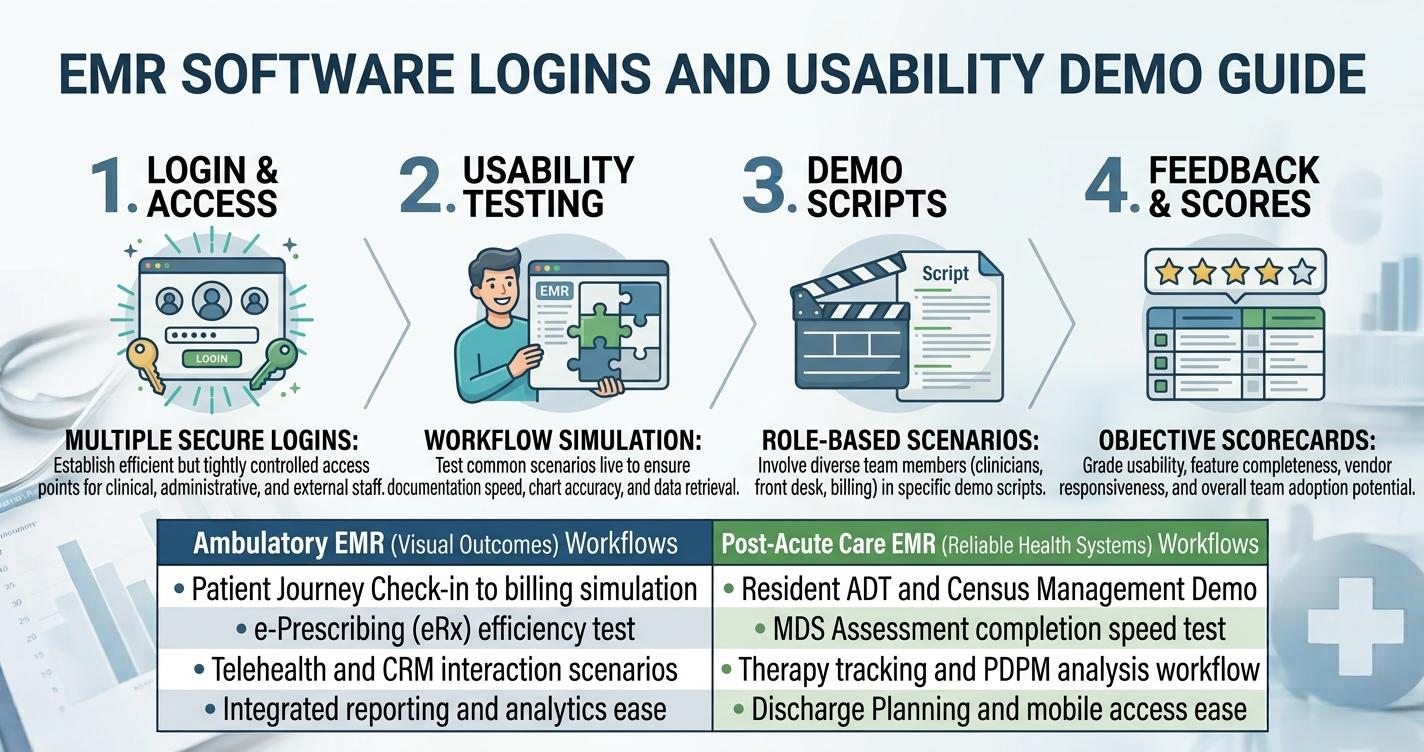
Healthcare professionals interact with their EMR throughout the working day, so usability can have a direct effect on how comfortably staff complete routine documentation and administrative tasks. That makes workflow, access, training, and support important areas when researching visual emr software.
There is an additional point buyers should understand at the beginning of their research. The name Visual EMR is associated with different healthcare software products. One public listing describes a Visual EMR platform with EHR and practice-management capabilities, while Reliable Health Systems provides VISUAL Clinical Software for nursing homes and assisted-living environments.
The exact vendor should therefore be confirmed before comparing products.
What is visual emr software used for in healthcare?
visual emr software used for during everyday patient care?
Electronic medical records are intended to keep healthcare information organized digitally. Depending on the product, the system can also support administrative workflows.
The Visual EMR described publicly by Software Finder includes scheduling, billing, reporting, patient portals, e-prescribing, and other practice-management capabilities.
Reliable Health Systems' VISUAL EMR is focused on clinical workflows for nursing-home and assisted-living organizations. Its official documentation includes resident census, MDS assessments, therapy tracking, PDPM analysis, reporting, custom forms, and discharge planning.
This means the usefulness of the software depends heavily on the healthcare environment where it is deployed.
What should users know about visual emr software login?
The login experience is one of the first parts of the system users encounter.
A publicly accessible Reliable Health Systems VISUAL EMR login page includes username and password fields and a forgotten-password option.
However, users should access the system through the official address provided by their organization. Healthcare records can contain sensitive information, so employees should not enter credentials into unfamiliar websites.
Administrators should also explain account recovery procedures before staff begin using the system.
How can organizations make login easier for staff?
Ease of access does not mean removing appropriate security controls.
Organizations should establish clear procedures for new accounts, password recovery, user permissions, and employee offboarding. Staff should know whom to contact when they cannot access the system.
During implementation, administrators can document the login process and provide training for common access problems.
A straightforward support process can prevent avoidable delays when employees need to reach patient information during normal operations.
What happens during a visual emr software demo?
A visual emr software demo gives organizations an opportunity to see how the platform behaves before committing to it.
Instead of asking the vendor to provide a general tour, create several realistic scenarios.
For example, a clinic might ask the vendor to demonstrate patient registration, record retrieval, documentation, scheduling, reporting, and billing. A long-term-care organization could focus on resident census, MDS, therapy, care documentation, and discharge-related workflows.
The more closely the demo reflects actual work, the more useful it becomes.
Which visual emr software features should users test?
The most important visual emr software features are those staff will use regularly.
Public information for one Visual EMR product includes appointment management, e-prescriptions, billing, customizable forms, reporting, and patient portal functionality.
Reliable Health Systems documents features such as custom forms, mobile access, reporting, therapy tracking, and provider panels for its VISUAL system.
Rather than simply checking whether a feature exists, test how many steps are required to use it. Staff feedback can be especially valuable because clinicians and administrative employees may notice workflow issues that are not obvious during a sales presentation.
What do visual emr software reviews reveal?
Reviews are useful for discovering questions that deserve closer examination.
The currently available third-party listing reports two reviews and a 3.5/5 overall rating. Published feedback includes positive observations about functionality and user experience, while the listing also notes that some advanced capabilities may involve a learning curve.
Because the review sample is small, it should not be treated as representative of every user.
When reading visual emr software reviews, pay attention to comments that match your own environment. A workflow issue that matters greatly to one specialty may have little relevance to another.
What should you know about visual emr software pricing?
Pricing information should always be checked against the exact product and current quotation.
One third-party listing currently reports a starting structure of $450 for the first three practitioners and $150 per additional practitioner. It also states that pricing can change.
For that reason, organizations should treat online visual emr software prcing information as a starting reference rather than a final commitment.
Ask the vendor for an itemized quotation showing implementation, users, modules, support, and recurring charges.
Is Visual EMR the same as an EHR?
EMR and EHR are closely related healthcare technology terms, but organizations should examine the actual capabilities of a specific product.
The Visual EMR described by Software Finder is presented as including EHR functionality.
Reliable Health Systems, on the other hand, describes VISUAL Clinical Software as an EMR designed for specific care environments.
If information exchange with outside systems is a requirement, buyers should ask the vendor specific interoperability questions rather than assuming the word EHR guarantees a particular capability.
What should you check before you get visual emr software?
Before you get visual emr software, identify the workflows that matter most to your organization.
List the documentation tasks, administrative processes, reports, patient-access requirements, and user roles that the system must support.
Then use those requirements during the demo.
Ask for clarification whenever a feature is described vaguely. It is better to understand limitations before purchase than to discover them during implementation.
Is it worth researching before you buy visual emr software?
Research can reduce uncertainty around a major software purchase.
Before you buy visual emr software, compare the exact vendor, product scope, features, access model, demo results, reviews, support, implementation requirements, and current pricing.
Healthcare organizations should also consider privacy and security requirements appropriate to their environment. The VA technology reference for Reliable Health Systems VISUAL specifically highlights the need to protect sensitive information and follow applicable security policies.
How can Codatis help with EMR and EHR research?
Codatis can be used to explore EMR and EHR software information before speaking with vendors.
A useful research process is to identify the organization's requirements first, investigate relevant software, review documented features, attend demonstrations, and then compare commercial proposals.
This approach keeps the focus on practical needs instead of relying entirely on promotional descriptions.
Final thoughts on Visual EMR software
Visual EMR can support healthcare workflows, but the exact capabilities depend on the product and vendor behind the name. Public information shows meaningful differences between Visual EMR products, making product identification an important first step.

 English
 Arabic
 French
 Portuguese
 Deutsch
 Turkish
 Dutch
Dutch
 Italiano
 Russian
 Romaian
 Portuguese (Brazil)
 Greek
Greek