
How Can Practice Management Software Save Time and Reduce Costs?
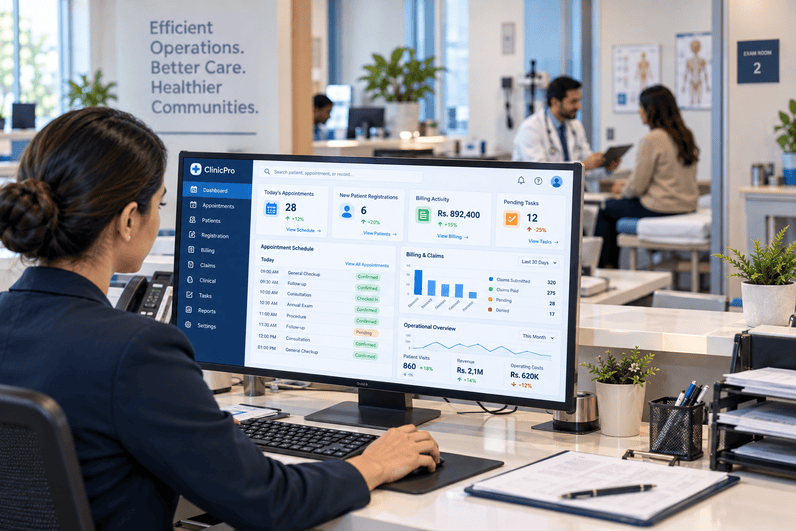
A medical clinic can have a busy schedule and still lose valuable time to administrative work. Staff may move between scheduling tools, patient records, insurance portals, billing systems, spreadsheets, phone calls, and reporting processes throughout a single day.
None of these tasks is necessarily difficult by itself. The problem is the accumulation of small inefficiencies.
A receptionist may need to enter the same patient information more than once. A billing employee may switch between systems to verify a claim. A practice manager may spend part of the afternoon collecting information from different reports just to understand how the clinic performed that day.
This is where medical practice management software can make a practical difference. By bringing scheduling, patient management, billing, reporting, and other administrative processes into a connected environment, clinics can reduce unnecessary handoffs and make routine work easier to manage.
The financial impact matters, too. Time spent correcting errors, chasing information, handling preventable claim problems, or manually preparing reports represents an operational cost even when it does not appear as a separate line item on the budget.
The goal, then, is not simply to automate everything. It is to identify where staff time and practice resources are being consumed unnecessarily and use technology to create a cleaner workflow.
The best efficiency improvements often come from removing small sources of friction that staff encounter dozens of times every day.
Key Statistics: The Cost of Administrative Complexity
Administrative burden continues to affect physician practices and healthcare organizations. The American Medical Association has reported that physicians and their teams spend substantial time dealing with administrative requirements, while the Office of the National Coordinator for Health Information Technology continues to identify usability and workflow alignment as important factors in reducing technology-related burden.
A few findings help put the issue into perspective:
- Physicians and their staff reported spending an average of 13 hours per week on prior authorization work for a single physician in the AMA's 2025 survey.
- 40% of physicians surveyed said they have staff whose primary responsibility is handling prior authorization tasks, showing how administrative requirements can require dedicated personnel.
- ONC's 2026 analysis of more than 8,400 family physicians found that 34% reported substantial after-hours EHR work, although this was an improvement from 41% in 2024.
- CMS has projected substantial administrative savings from electronic health care claims attachment standards, reflecting the broader push toward reducing manual healthcare transactions.
These statistics cover different administrative processes, so they should not be interpreted as a direct measurement of practice management software savings. They do show why clinics continue looking for ways to reduce repetitive administrative work.
Which Everyday Clinic Tasks Consume the Most Staff Time?
Administrative workload often hides in routine activities.
Scheduling appointments, confirming visits, registering patients, checking insurance information, processing payments, preparing claims, answering billing questions, and generating reports may each take only a few minutes. Across hundreds or thousands of interactions, those minutes become a meaningful operational cost.
Common time-consuming tasks include:
- Appointment coordination: Finding suitable times, rescheduling patients, managing cancellations, and keeping provider calendars accurate.
- Patient registration: Collecting demographic and insurance information and correcting incomplete records.
- Insurance verification: Confirming eligibility and coverage before services are provided.
- Billing preparation: Reviewing charges, preparing claims, and checking information before submission.
- Payment processing: Recording payments and adjustments and reconciling financial information.
- Patient communication: Managing appointment reminders, billing notifications, and routine administrative questions.
- Reporting: Collecting information from different systems to understand practice performance.
- Data correction: Fixing duplicate, incomplete, or inconsistent information.
The challenge is especially noticeable in smaller clinics where the same employees often handle several of these functions.
A practice may not need more people to solve every administrative problem. Sometimes the better starting point is reducing the number of manual steps each employee has to complete.
How Can Better Scheduling Workflows Save Valuable Clinic Time?
Scheduling affects almost every other part of clinic operations. When appointments are poorly coordinated, the consequences can extend to patient wait times, provider utilization, staff workload, and revenue.
A scheduling process that depends heavily on phone calls and manual calendar updates can also create unnecessary interruptions.
A more organized scheduling workflow can help staff:
- See Availability More Clearly: A centralized calendar can make provider availability easier to review. Staff spend less time checking separate calendars or asking multiple people about open appointment slots.
- Automate Routine Reminders: Automated reminders can reduce the need for employees to call every patient individually. Patients can receive notifications about upcoming appointments and, depending on the system, confirm or manage their appointments.
- Manage Cancellations: When a patient cancels, staff can use waitlists or other scheduling workflows to identify opportunities to fill the opening rather than leaving the time unused.
- Coordinate Multiple Providers: Clinics with several providers can manage schedules within a shared environment, helping reduce conflicts and making appointment coordination more organized.
FutureMD's official practice management platform includes online scheduling, at-a-glance schedule viewing, automated patient reminders, appointment tracking, and waitlist functionality. These tools are designed to bring common scheduling activities into a centralized workflow.
The value is straightforward: fewer scheduling steps can mean fewer interruptions for staff.
Can Centralized Patient Information Reduce Duplicate Work?
Patient information often touches multiple parts of a clinic. Registration needs demographic details. Scheduling needs contact information. Billing needs insurance information. Clinical teams need access to relevant patient records.
When each department maintains separate information, staff may repeatedly enter or verify the same details.
A centralized approach can reduce some of that repetition.
Potential workflow improvements include:
- Entering patient demographic information once and making it available to authorized users.
- Keeping insurance information accessible to staff who need it.
- Connecting appointment details with the appropriate patient record.
- Reducing duplicate patient records.
- Giving administrative teams a clearer view of relevant patient information.
- Reducing the need to request information from another department.
This does not mean every employee should have access to every piece of patient information. Appropriate role-based access and privacy controls remain essential.
The efficiency benefit comes from making the right information available to the right employee at the right stage of the workflow.
For example, a staff member confirming an appointment should not need to search through several unrelated systems just to verify a patient's contact information.
How Does Automation Reduce Repetitive Administrative Work?
Automation is most useful when applied to tasks that follow predictable rules.
A clinic does not need employees manually completing every routine notification or administrative update if technology can perform the task consistently.
Examples include:
- Appointment Reminders: Systems can send reminders without requiring staff to make every call manually.
- Billing Notifications: Automated notifications can help communicate routine billing information without requiring employees to initiate every message.
- Task Assignments: Digital workflows can route administrative tasks to the appropriate employee instead of relying on paper notes or informal messages.
- Claim Processing Support: Automated billing workflows can help prepare, track, and organize claims, reducing some manual administrative steps.
- Reporting Updates: Instead of manually rebuilding the same report each week, staff can use recurring dashboards and reporting tools to monitor operational information.
Automation does not mean removing people from the process. Employees still need to handle exceptions, patient questions, unusual billing situations, and decisions that require professional judgment.
The point is to keep employees from spending valuable time on tasks that technology can handle consistently.
Where Does Cost Reduction Come From in Practice Management?
Saving money is not always about reducing headcount. In healthcare operations, cost reduction can also come from avoiding wasted staff time, preventing errors, improving schedule utilization, and reducing unnecessary administrative rework.
Several areas can influence operating costs:
- Staff productivity: Employees can spend less time on repetitive data entry and manual coordination.
- Reduced rework: Better-connected workflows can reduce corrections caused by missing or inconsistent information.
- Scheduling efficiency: Better appointment management can help clinics make better use of available provider time.
- Lower paper dependence: Digital workflows can reduce printing, scanning, filing, and physical document handling.
- Billing workflow efficiency: Organized claim and payment processes can reduce manual financial administration.
- Reporting time: Managers can spend less time compiling information manually.
- Training consistency: Standardized workflows can make routine processes easier for employees to follow.
- Scalability: A growing practice may be able to manage additional volume without adding administrative steps at the same rate.
The actual savings will differ between organizations. A clinic with a small administrative team may see value from reducing a few recurring tasks, while a larger multi-provider organization may benefit from standardizing workflows across locations.
Cost reduction should therefore be measured against the clinic's actual workload rather than assumed from a feature list.
How Can Billing Workflows Become More Efficient?
Financial administration is one of the areas where disconnected workflows can create significant rework.
A patient encounter may begin with eligibility verification and continue through charge capture, coding, claim submission, payment posting, denial management, and accounts receivable follow-up.
When information has to be transferred manually between systems, every additional handoff creates another opportunity for delay or error.
This is where healthcare revenue cycle management becomes part of the broader efficiency discussion. A connected financial workflow can give staff better visibility into claims, payments, denials, and outstanding balances while reducing some of the manual work involved in monitoring those activities.
Efficient billing workflows can include:
- Eligibility verification before services are provided.
- Charge capture based on the documented encounter.
- Coding review to support accurate claims.
- Claim submission through established electronic workflows.
- Claim tracking to identify accounts requiring attention.
- Payment posting and reconciliation.
- Denial management for claims that require additional action.
- A/R monitoring for outstanding balances.
- Reporting to give practice leaders visibility into financial performance.
FutureMD's all-in-one platform describes capabilities including patient eligibility and benefits verification, charge capture and coding compliance, rule-based claim scrubbing, claims management and submission, denial management and appeals, payment posting and reconciliation, and revenue cycle reporting.
The objective is not simply faster billing. It is creating a workflow where financial information can move through the practice with fewer unnecessary manual steps.
Can Real-Time Reporting Help Practice Managers Make Better Decisions?
A practice manager cannot improve what they cannot see.
Yet many clinics still rely on reports that must be manually collected, formatted, and reconciled before management can use them.
By the time the report is ready, the underlying situation may have already changed.
A centralized reporting environment can provide a more current view of practice operations.
Managers may monitor areas such as:
- Appointment volume
- Schedule utilization
- Provider productivity
- Patient activity
- Billing performance
- Collections
- Outstanding accounts
- Revenue trends
- Operational workload
The benefit is not having more numbers. It is having relevant information available when a decision needs to be made.
For example, if a clinic notices that one provider consistently has unused appointment capacity on a particular day, management can investigate scheduling patterns rather than discovering the issue weeks later through a manually prepared report.
FutureMD's practice management platform provides real-time reporting and quick-view dashboards designed to give practices visibility into scheduling, billing, and operational activity.
What Should Clinics Look for When Choosing Practice Management Technology?
Not every software platform will produce the same operational result. The right choice depends on the clinic's size, specialty, staffing structure, existing technology, and growth plans.
Ease of Use
A system should make common tasks easier rather than forcing staff through unnecessary screens and steps.
Scheduling Capabilities
Look for appointment management, reminders, availability views, cancellation handling, and support for multiple providers or locations when relevant.
Billing Connectivity
Administrative and financial workflows should work together rather than requiring staff to repeatedly move information between separate applications.
EHR Integration
If the practice already uses an EHR, the systems should be able to exchange relevant information appropriately. Reducing duplicate entry is one of the main reasons integration matters.
Reporting
Managers need practical reports and dashboards that help them understand what is happening in the practice without excessive manual preparation.
Automation
Identify which recurring tasks can be automated and, just as importantly, which tasks should remain under human review.
Scalability
The system should support changes in provider count, patient volume, locations, and services without creating unnecessary operational disruption.
Security and Compliance
Healthcare systems handle sensitive patient and financial information. Clinics should evaluate access controls, data protection, audit capabilities, and applicable privacy and security requirements.
Implementation and Support
Even a capable platform can create problems if implementation is rushed. Training, workflow configuration, data migration, and ongoing support should be part of the evaluation.
The right technology should fit the clinic's workflow. Staff should not have to redesign every daily task simply to accommodate the software.
How Can Clinics Measure Whether They Are Actually Saving Time and Money?
Buying software is not the same as achieving efficiency.
Clinics need to establish what their current workflows cost in time and resources, then measure whether those numbers change after implementation.
Useful measures include:
- Administrative hours: Track how much staff time is spent on scheduling, registration, billing, reporting, and related activities.
- Data-entry volume: Measure how often employees enter the same information into multiple systems.
- Appointment handling time: Review the time required to schedule, reschedule, and confirm appointments.
- No-show activity: Monitor missed appointments and the amount of staff effort spent managing them.
- Claim rework: Track how many claims require correction or additional handling.
- Payment posting time: Measure how quickly financial transactions are recorded.
- Report preparation time: Compare the time required to produce routine management reports.
- Paper usage: Monitor printing, scanning, and physical document handling where these remain part of the workflow.
- Staff interruptions: Ask employees which recurring administrative tasks interrupt other responsibilities.
- Cost per administrative process: Where practical, estimate the labor and resource cost associated with common workflows.
The most useful measurement is often comparative.
For example, if scheduling currently requires several manual steps, measure the average time per appointment before and after a workflow change. If management spends hours preparing weekly reports, measure how much of that process can be eliminated or simplified.
This gives the practice evidence about what is actually improving rather than relying on assumptions.
A Hypothetical Clinic Example: Turning Fragmented Tasks Into a Connected Workflow
Because no independently verified customer case study with documented before-and-after results is being presented here, this is a hypothetical example, not a real FutureMD customer outcome.
The Situation
Consider a hypothetical five-provider outpatient clinic where employees manage scheduling, registration, insurance checks, billing coordination, patient reminders, and reporting through several separate processes.
The Challenge
Staff spend considerable time moving information between systems, confirming appointments manually, preparing reports, and resolving administrative inconsistencies.
The Action
The clinic maps its daily workflows and identifies repetitive tasks that can be centralized or automated. It introduces connected scheduling, patient management, billing, reporting, and workflow tools, then trains employees on the revised processes.
Practical Lessons
The example shows that efficiency improvements often begin with workflow mapping rather than software selection alone.
Clinics can apply the same approach by:
- Identifying the administrative tasks that consume the most staff time.
- Finding where the same information is entered more than once.
- Automating predictable routine tasks.
- Connecting scheduling, patient, and financial workflows where appropriate.
- Establishing baseline measurements before implementation.
- Reviewing performance after implementation and adjusting workflows when needed.
The hypothetical clinic does not demonstrate a guaranteed percentage of time or cost savings. It illustrates how a practice can approach technology as a way to remove unnecessary administrative steps.
Time and Cost Management: Manual vs. Connected Clinic Workflows
The comparison below illustrates how connected technology may change routine administrative processes. The potential effects are workflow considerations, not guaranteed outcomes.
|
Clinic Activity |
More Manual Workflow |
Connected Digital Workflow |
Potential Operational Effect |
|
Appointment scheduling |
Staff coordinate calendars and reminders manually |
Centralized scheduling with automated reminders |
Less repetitive scheduling work |
|
Patient registration |
Information is collected across separate processes |
Patient details are maintained in a connected record |
Less duplicate entry |
|
Insurance verification |
Staff check information manually across systems |
Eligibility workflows are integrated into administrative processes |
Fewer repetitive verification steps |
|
Billing preparation |
Staff transfer information between systems |
Billing workflows use connected patient and encounter information |
Less manual transfer |
|
Claim tracking |
Employees check individual claim statuses |
Digital tools provide centralized claim visibility |
Less routine status checking |
|
Payment posting |
Staff manually process and reconcile payment information |
Electronic payment workflows support posting and reconciliation |
Reduced repetitive processing |
|
Reporting |
Managers compile information from multiple sources |
Dashboards provide centralized operational information |
Less report preparation time |
|
Patient reminders |
Staff make individual calls or send messages |
Automated reminders handle routine notifications |
Fewer manual communications |
|
Administrative tasks |
Paper notes, emails, or informal requests |
Digital task workflows assign and track work |
Better visibility into pending tasks |
A connected system does not guarantee lower costs. The outcome depends on implementation, workflow design, staff adoption, integration quality, patient volume, and how effectively the clinic uses the available capabilities.
Frequently Asked Questions About Practice Management Efficiency
How can practice management technology save clinics time?
It can reduce repetitive administrative tasks by centralizing scheduling, patient information, billing, reporting, reminders, and other workflows. The amount of time saved depends on the clinic's existing processes and how the technology is configured and adopted.
Can practice management software reduce staffing costs?
It may reduce the amount of staff time required for certain repetitive tasks, but clinics should not assume that software automatically reduces headcount. Savings may instead come from allowing existing employees to spend more time on higher-value responsibilities.
How does scheduling automation help medical clinics?
Automated scheduling tools can centralize provider availability, send appointment reminders, support cancellations and rescheduling, and help manage waitlists. These functions can reduce manual coordination and improve visibility into the daily schedule.
Can integrated billing workflows reduce administrative costs?
Connected billing workflows can reduce manual information transfers, simplify claim tracking, support payment processing, and provide better visibility into financial activity. The actual cost effect depends on the clinic's current billing process and implementation.
What should a clinic measure after implementing new management technology?
Clinics can track administrative hours, appointment handling time, duplicate data entry, claim rework, payment posting time, report preparation time, no-show activity, staff interruptions, and other measures relevant to their workflow.
Final Thoughts: Making Clinic Operations More Efficient
Saving time and reducing costs in a medical practice rarely comes from one feature. The larger opportunity comes from connecting the everyday processes that staff already perform and removing unnecessary repetition between them.
Better scheduling can reduce manual coordination. Centralized patient information can limit duplicate data entry. Automation can handle predictable tasks. Connected billing workflows can make financial activity easier to monitor. Real-time reporting can give practice managers the information they need without requiring hours of manual preparation.
FutureMD Solutions' practice management platform brings together scheduling, patient management, billing, reporting, workflow automation, and related administrative functions. Its official platform information includes automated appointment reminders, online scheduling, billing workflows, real-time reporting, claims management, payment processing, and revenue cycle capabilities.
The best results come when clinics first understand where time and resources are being lost, then configure technology around those specific problems. A practice does not need to automate every task. It needs to make routine work easier, give staff clearer workflows, and provide managers with enough visibility to make informed decisions.
In that sense, the real value of practice management technology is not simply doing more with fewer resources. It is helping healthcare teams spend their limited time on the work that matters most.

 English
 Arabic
 French
 Spanish
 Portuguese
 Deutsch
 Turkish
 Dutch
Dutch
 Russian
 Romaian
 Portuguese (Brazil)
 Greek
Greek