401 Error: What It Means, Common Causes, and How to Fix It
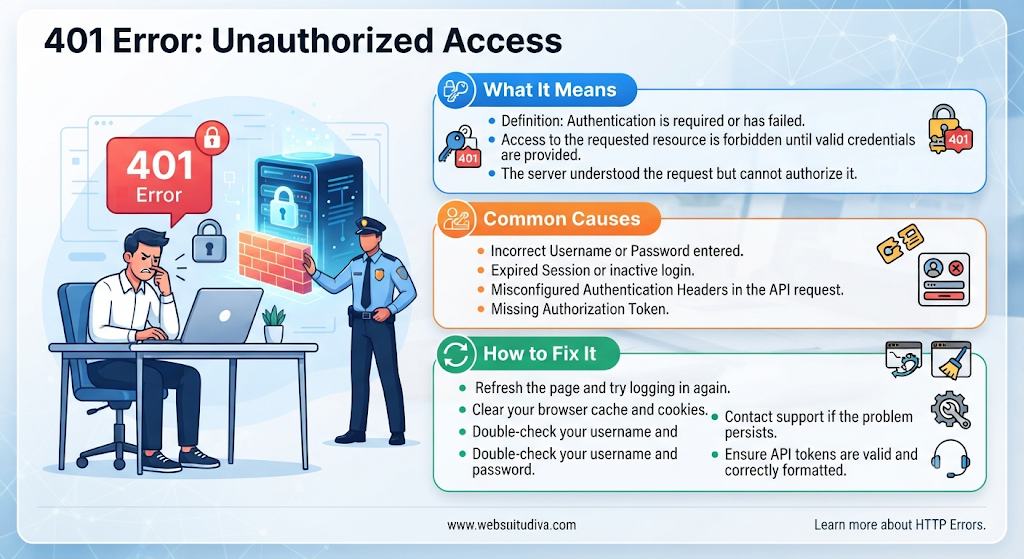
A 401 error, also known as an HTTP 401 Unauthorized error, is a common website error that occurs when a user tries to access a webpage or online resource without providing valid authentication credentials. It indicates that the server cannot verify the user's identity and requires proper authentication before granting access.
This error can appear when browsing websites, accessing online accounts, using APIs, or working with web applications. Understanding the causes of a 401 error and knowing how to resolve it can help website owners and visitors maintain a smooth browsing experience.
What Is a 401 Unauthorized Error?
A 401 Unauthorized error is an HTTP response status code that indicates an authentication problem. It usually occurs when a website requires users to log in before accessing restricted content.
For example, when someone tries to open a private dashboard without signing in, the server may return a 401 error. Similarly, incorrect usernames, expired passwords, or missing authentication tokens can prevent access to protected resources.
Unlike a 403 Forbidden error, which means the server understands the request but refuses permission, a 401 error generally means the user needs to authenticate successfully.
Common Causes of a 401 Error
Several factors can trigger an HTTP 401 error. Some of the most common causes include:
-
Incorrect Login Credentials: Entering an incorrect username or password can prevent the server from verifying your identity.
-
Expired Login Sessions: Some websites automatically expire sessions after a certain period, requiring users to log in again.
-
Missing Authentication Tokens: APIs and web applications often require authentication tokens. If a token is missing, invalid, or expired, the server may return a 401 response.
-
Browser Cache and Cookies: Outdated or corrupted cookies can interfere with website authentication.
-
Restricted Website Access: Certain webpages require users to have an active account or valid subscription.
-
Server Authentication Issues: Incorrect server configurations or authentication settings can also cause unauthorized access errors.
How to Fix a 401 Unauthorized Error
Resolving a 401 error depends on its underlying cause. Here are some practical solutions:
-
Check Your Login Details: Make sure you are using the correct username and password. Reset your password if necessary.
-
Log In Again: Sign out of your account and sign in again to refresh your authentication session.
-
Clear Browser Cache and Cookies: Remove outdated browser data that may interfere with authentication.
-
Check the Website URL: Ensure that you are accessing the correct webpage and not an outdated or restricted link.
-
Refresh Authentication Tokens: If you are working with an API, generate a new access token and verify that it is included correctly in your request.
-
Contact Website Support: If the problem continues, contact the website administrator or hosting provider for assistance.
How to Fix a 401 Error as a Website Owner
If you manage a website, resolving recurring 401 errors is important for maintaining accessibility and security. Consider these steps:
-
Review Authentication Settings: Check whether your website's login and authentication systems are configured correctly.
-
Check Server Configuration: Review server rules and authentication settings to identify incorrect configurations.
-
Verify API Permissions: Ensure that API keys, access tokens, and authorization headers are valid.
-
Update Website Plugins: Outdated plugins or authentication extensions can sometimes cause access problems.
-
Monitor Website Security: Regularly review login activity and security settings to identify potential issues.
Professional website maintenance can help identify technical problems and keep your website functioning properly.
Difference Between 401 and Other HTTP Error Codes
Understanding different HTTP status codes helps website owners diagnose technical problems more effectively.
|
Error code |
Meaning |
|---|---|
|
401 |
Unauthorized access due to authentication issues |
|
403 |
Forbidden access due to insufficient permissions |
|
404 |
Requested webpage cannot be found |
|
500 |
Internal server error |
|
503 |
Service temporarily unavailable |
Each error represents a different problem and requires an appropriate troubleshooting approach.
Conclusion
A 401 Unauthorized error occurs when a server cannot authenticate a user's request because valid login credentials or authentication information are missing, incorrect, or expired. It commonly affects websites, online accounts, and API connections.
Visitors can resolve many 401 errors by checking login details, clearing browser cookies, and signing in again. Website owners should review authentication settings, server configurations, and API permissions to prevent recurring issues.
At Digital Addex, we understand the importance of secure, reliable, and well-maintained websites. Our website development and maintenance services help businesses improve website performance, resolve technical issues, and deliver a better user experience.

 English
 Arabic
 French
 Spanish
 Portuguese
 Deutsch
 Turkish
 Dutch
 Russian
 Romaian
 Portuguese (Brazil)
 Greek